Meno Pro
- 4.4
- Rating
- 10.00K
- Installs
- Free
- Price

 Analysis by App-foxy
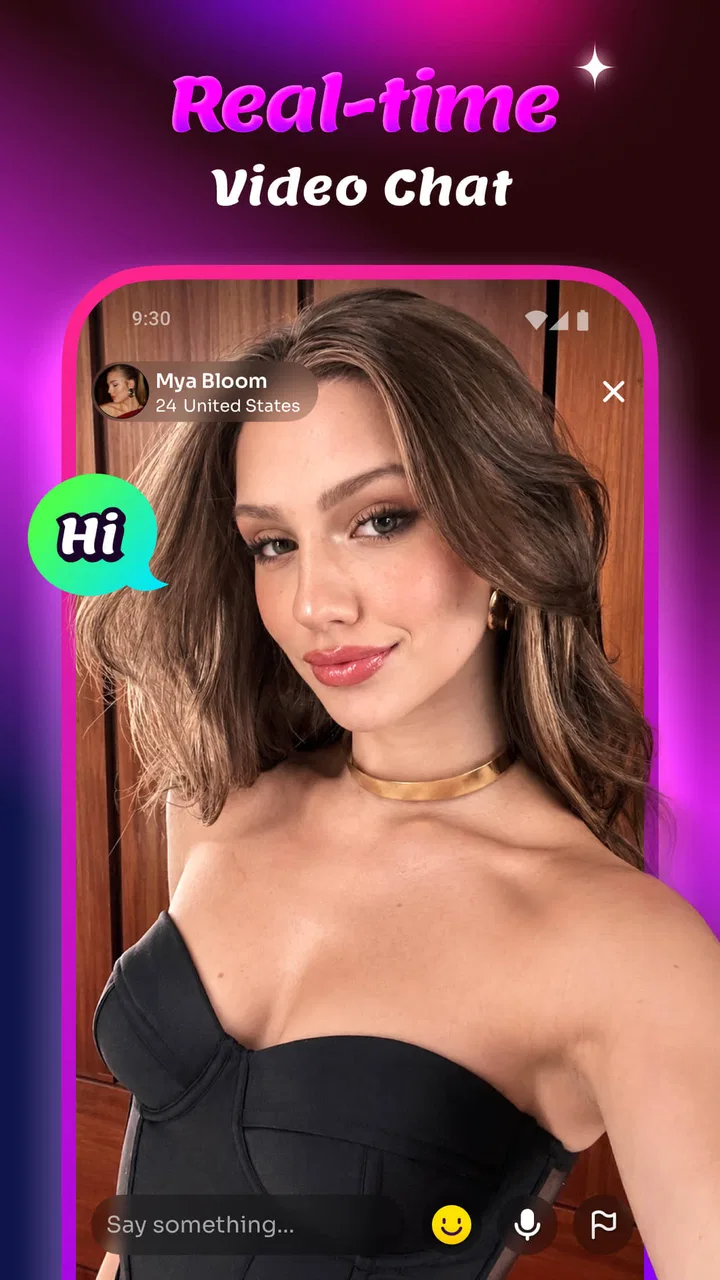
I approached Meno Pro as a casual social app for people who want to meet new friends through video rather than relying only on text. That distinction matters in a household, because a video-chat service is not something I would treat like a shared puzzle game or a general entertainment app. It involves personal conversations, visible surroundings, and decisions about who is using the device and when.
My overall impression is that Meno is most interesting for an adult who wants a lightweight way to have live conversations with new people. It feels less suitable as an all-purpose family app, especially when several people share one phone or tablet. The Lifestyle category is a reasonable fit, but the real experience is social and immediate: you open it for interaction, not for quietly browsing content.
How Meno Pro fits into shared household use
The first practical test is simple: imagine the app installed on a tablet that sits in a common room. One person may use it after dinner, another may pick up the device later, and someone else may assume that a previous conversation has nothing to do with them. That is where I would be careful. Meno is built around meeting new friends by video, so the device should be treated as a personal communication tool rather than a communal screen.
You May Also Like

 Blood Strike: 2.5 Anniversary
Blood Strike’s Loadouts Turn Every Drop Into a Tactical Gamble
A close look at Blood Strike’s custom loadouts: how fast access to signature weapons reshapes its battle royale rhythm, rewards preparation, and narrows the gap between fights.

 Pandora - Music & Podcasts
Pandora’s Music Is Easy to Start, but Harder to Recover
Pandora’s strength is its low-effort path from a seed to a station. Its weak spot is how much confidence it asks you to place in connection, setup, and quiet recovery.

 8 Ball Pool
 Is Built on Rivalries, Rematches, and Routine
A close look at the rivalries, rematches, shared routines, and unanswered safety questions that turn a quick pool match into a persistent mobile community.

 Samsung Music
’s Quiet Strength Is Playing What You Already Own
Its reach comes less from spectacle than from dependable access to a personal library. That simplicity is both the app’s strongest retention engine and its ceiling.

 AccuWeather: Weather Radar
AccuWeather Review: A Quick, Clear Forecast for Everyday Decisions
For everyday plans, the best forecast is the one you can understand quickly. AccuWeather makes rain timing, radar, and local conditions easy to act on, with a few trade-offs.

 Hill Climb Racing
Why Hill Climb Racing Still Turns Crashes Into One More Run
A tiny car, a bumpy hill and one more upgrade: Hill Climb Racing keeps resurfacing because its simple chaos makes every near-miss feel personal.
More From Our News Desk
View All News


In my experience, the best shared-device arrangement is to agree on a clear user before opening the app. If I were lending the tablet to another adult, I would make sure the previous user had finished, closed the session, and removed the device from the conversation area. That small routine prevents awkward handoffs and reduces the chance that the next person appears on camera without understanding what is happening.
A realistic example would be two adults sharing one Android tablet. One person uses Meno during a private break, then leaves the tablet charging in the kitchen. The second person later wants to use it for something else. I would not assume that the first session is automatically irrelevant just because the app is no longer visible on screen. I would ask the first user to end their activity clearly and return the device to a neutral state.
This is also why I would avoid presenting Meno as an app for children to explore casually. The mature age classification is an important part of the decision, and it changes how I would place the app in a household. It belongs in an adult’s personal app area, with the same basic care I would apply to any service involving live conversations with unfamiliar people.
That may sound cautious, but it is useful caution rather than a criticism of the concept. Video makes conversations feel more direct than messaging, while also making the environment around the user part of the interaction. A private room, a busy family space, or a visible work desk can all reveal more than the user intended.
What the first session feels like
The appeal is easy to understand. Instead of writing a long profile or waiting for a reply, I can use a live conversation as the main way to judge whether an interaction feels comfortable. That immediacy can be refreshing when text-based social apps start to feel repetitive.
At the same time, a first video conversation asks more from me than a text exchange. I need to think about lighting, background noise, camera position, and whether I am in the right place to talk. The app may be quick to open, but the user experience depends heavily on preparation outside the app.
I found that the most sensible approach is to use it in short, deliberate sessions. I would choose a quiet place, keep the device stable, and avoid starting when other household members are moving through the room. This is one of the less obvious trade-offs: a service designed for spontaneous connection still benefits from a little planning.
For someone who enjoys meeting people through conversation and does not mind being seen, that directness can be the strongest reason to try it. For someone who prefers carefully written introductions, slow replies, or complete control over what is shared, the same design may feel too exposed.
Keeping account boundaries clear
On a shared device, I would establish account boundaries before anyone uses the app. I would not let different household members treat one visible session as if it belonged to everyone. Personal conversations should stay attached to the person who started them, and the device should not become a shortcut into another person’s social activity.
This matters even more if the device is used by teenagers alongside adults. The mature rating means I would keep the app away from unsupervised access by younger household members. I would also explain that a familiar family device does not make every conversation safe or appropriate for every person using it.
I would not rely on the app’s presence alone to create household rules. Instead, I would use ordinary device habits: separate user profiles where available, a lock screen, and a clear agreement about who may open the app. Those are practical boundaries around Meno, not features I am claiming the app provides.
Another useful habit is to avoid saving the app in a place where a child might open it accidentally while looking for a game or video service. A separate folder or adult-only home screen is a simple visual reminder. It also prevents the app from being mistaken for a general-purpose communication tool with no age context.
Coordinating use without making the app feel like a chore
Coordination is important when a phone or tablet is shared, but I would keep it lightweight. A household does not need a complicated schedule for a social app. A simple rule such as “use it only when the device is yours and the room is private” handles most of the practical problem.
If two adults both want to use Meno, I would avoid passing the device directly from one person to the next while a session is still active. Ending one person’s use before beginning another creates a clean boundary and avoids accidental appearances on camera. It also gives the next user a chance to check whether the device is connected to the intended account.
For a family that shares a single phone, Meno is less convenient. The person using it may need privacy that a family phone cannot offer. Notifications, interruptions, and incoming calls can also make a live social session feel disjointed, even when the app itself is easy to access.
That is where a personal device is a better match. I would recommend Meno to an adult who can control when and where the app is used, rather than to a household looking for one social platform everyone can share. The difference is not about the number of people in the home; it is about whether the user has a private boundary around the conversation.
There is also a social coordination issue. If I am talking with someone new, I should not let another household member interrupt, comment from off-camera, or appear unexpectedly. A quick explanation to people nearby is enough: this is a private conversation, and the room should remain out of the interaction.
Age, trust, and sensible expectations
Meno carries a Mature 17+ content rating, so I would take that seriously when deciding who can use it. The rating is not a substitute for judgment, but it is a clear signal that the app should be approached as an adult-oriented social experience rather than a child-friendly discovery tool.
My advice to a new user is to start with limited personal information. I would avoid showing documents, work screens, school details, house numbers, or anything in the background that identifies where I live. Video can reveal these details unintentionally, especially when the camera is pointed across a room instead of at a plain wall.
I would also trust discomfort as a reason to end a conversation. A user does not need to justify leaving a call that feels intrusive, confusing, or simply unpleasant. The best way to evaluate a new connection is to keep the first interaction low-stakes and avoid moving quickly into private details.
This is one area where Meno differs from a standard messaging app. Text gives me time to reread a message and decide how much to answer. Live video creates pressure to respond in the moment. Some people will find that more natural; others will prefer an app that lets them build trust gradually through profiles and written conversation.
I would also be careful with the word “friend.” A live chat can be enjoyable, but one good conversation does not establish trust. Meno can make meeting someone feel immediate, yet the user still needs to judge character over time. That is especially important when the app is used in a household where other people might assume that a friendly conversation is automatically harmless.
What version and pricing mean in daily use
The app is free to install, which makes trying the basic experience straightforward. It is currently on version 1.1.0, and it supports devices running Android 7.0 or later. That broad compatibility is helpful for households using an older spare phone or tablet, although the quality of a video conversation will still depend on the device, camera, microphone, and connection.
Meno is published by SOMEET TECHNOLOGY LIMITED. Its average rating is 4.4 from around 119 ratings, while the install count is above 10K. I see those figures as signs that people are trying the app, not as proof that it will suit every social style. A relatively small rating pool can shift as more users arrive, so I would judge it by the type of interaction I want rather than by the score alone.
The free entry point is useful, but the presence of in-app purchases ranging from $4.99 to $99.99 per item deserves attention in a shared household. I would not let another person, especially a younger user, assume that free installation means every part of the experience is free. On a shared device, purchase permissions should be controlled through the device account, and the person using Meno should understand that optional spending may exist.
This is another reason I prefer a personal account and a clear owner for the app. Shared payment settings can create confusion even when everyone in the household is acting in good faith. If I were installing it for myself, I would review the device’s purchase protections before handing the phone to anyone else.
Where it beats ordinary social alternatives
Compared with a traditional text-based friendship app, Meno’s strongest advantage is speed of human connection. A short video conversation can tell me more about conversational rhythm and comfort than a long exchange of carefully edited messages. If I am tired of profiles that never lead anywhere, that directness is appealing.
Compared with a general video-calling service, Meno is more focused on meeting new people rather than calling contacts I already know. That makes it useful for discovery, but it also removes the familiarity that makes ordinary calls feel predictable. A regular video messenger is better when I want reliable contact with family, friends, or colleagues.
Compared with social networks built around public posts, Meno may feel more personal because the interaction happens through conversation instead of a feed. The trade-off is that a live exchange can be harder to control. A public post can be edited or ignored; a video conversation demands a decision in real time.
I would choose Meno when my goal is to have a direct, informal conversation with someone new. I would choose a messaging app when I need a written record, more time to think, or a stronger separation between my identity and my surroundings. I would choose a conventional video-calling app when the other person is already known and trusted.
Small habits that improve the experience
My first practical tip is to use a neutral background. This is not just about looking tidy. It reduces the amount of personal information visible to a new contact and makes the conversation easier to focus on. A plain wall and a stable surface are more useful than a carefully staged room.
My second tip is to treat the first conversation as a short introduction, not an obligation to continue. If the exchange is awkward, ending it is a valid outcome. The app is meant to help people connect, but not every connection deserves more time.
My third tip is to separate social use from household multitasking. I would not start a Meno conversation while cooking, supervising a child, or moving around a shared room. Dividing attention makes it easier to reveal something unintentionally and makes the other person feel ignored.
A fourth useful habit is to check the device before each session. I would confirm that the camera is pointed where I expect, the microphone is not picking up a private household conversation, and the correct user is holding the device. That quick check is particularly valuable when several adults share one tablet.
Finally, I would keep spending and identity decisions separate from the excitement of a new conversation. A friendly interaction should not pressure me into buying something, sharing contact details, or making a commitment immediately. The free installation makes experimentation easy, but good judgment still has to come from the user.
Who should try it, and who should skip it
I think Meno is a good fit for adults who enjoy live conversation, want to meet new people, and can use a personal device in a private setting. It is also a reasonable option for someone who finds text-based social apps too slow or impersonal. The direct format gives the experience a human quality that a profile feed cannot always provide.
I would skip it if I am looking for a family-friendly app, a controlled space for children, or a dependable way to contact people I already know. It is also not my first choice for anyone who dislikes appearing on camera or prefers to reveal personal details gradually.
Households with one shared device should think carefully before installing it. The app can work if an adult controls the device and everyone respects clear boundaries, but it is not something I would leave available for casual browsing by every member of the home. A separate personal device makes the experience more comfortable and easier to manage.
People who are especially sensitive to unexpected conversations should also consider the trade-off. The whole point is to meet new friends through video, and that openness is both the attraction and the source of uncertainty. If I want predictable contacts and familiar routines, another category of app will serve me better.
My household verdict
Meno Pro has a clear idea: make new social connections through live video instead of relying entirely on written profiles and messages. I like the immediacy, and I can see why an adult who wants more natural conversation would give it a try. The free installation lowers the barrier to testing that idea, while the current Android support makes it accessible on many devices.
My recommendation comes with firm boundaries. I would use it as a personal adult app, on a device I control, in a private setting, with purchase protections in place. I would not present it to children, leave it open on a communal tablet, or assume that a pleasant first conversation automatically creates trust.
The app’s 4.4 average rating and growing install base suggest that it has found interest among users looking for this kind of interaction, but those figures do not remove the need for careful use. In my view, the best experience comes from treating Meno as a focused social tool rather than a general household communication app.
If that matches what you want, I think it is worth trying with realistic expectations. Use the video format to discover whether conversation feels natural, protect the privacy of everyone around the device, and keep account and spending boundaries clear. For a household, the right setup is more important than simply installing the app; with that in place, Meno can be a convenient way for an adult to explore new conversations without confusing personal social use with shared family entertainment.
FAQs for Meno Pro
01What is Meno Pro and who is it designed for?
Meno Pro is a menopause-focused app intended to help users understand and manage common symptoms such as hot flashes, sleep difficulties, mood changes, fatigue, and cycle-related changes. It may be useful for people in perimenopause, menopause, or postmenopause who want to record daily experiences and learn more about their wellbeing. However, it should be considered a support and information tool, not a replacement for professional medical advice.
02What features does Meno Pro offer?
The app generally centers on symptom tracking, personal observations, educational content, and progress insights. Depending on the version available on your device, you may be able to record symptoms, monitor changes over time, review patterns, and access practical guidance related to menopause. Before downloading, check the current store listing because features, content, subscription options, and availability can vary between Android and iOS versions or change after updates.
03Is Meno Pro free to download, and does it require a subscription?
Meno Pro may be available to download at no initial cost, but some tools, courses, reports, or premium content can require an in-app purchase or recurring subscription. We recommend reviewing the pricing page carefully before starting a trial, including the renewal date and cancellation terms. Removing the app usually does not cancel an active subscription, so cancellation must normally be completed through Google Play or the Apple App Store.
04Can Meno Pro diagnose menopause symptoms or provide medical treatment?
No. Meno Pro should not be used to diagnose a medical condition, prescribe treatment, or replace an appointment with a doctor, gynecologist, or other qualified healthcare professional. Tracking information can help you describe symptoms more clearly during a consultation, but unusual, severe, sudden, or worsening symptoms require professional evaluation. Seek urgent medical assistance for serious warning signs such as chest pain, severe bleeding, fainting, or difficulty breathing.
05Is personal health information safe when using Meno Pro?
Because Meno Pro may involve sensitive information about symptoms, mood, sleep, age, or reproductive health, privacy is an important consideration before creating an account. Read the app’s privacy policy to understand what data is collected, where it is stored, whether information is shared with service providers, and how deletion requests work. Use a strong password, avoid entering unnecessary identifying details, and review app permissions before granting access.
Pros
- Simple interface makes daily tracking quick and easy.
- Useful tools help organize personal goals and routines.
- Lightweight app runs smoothly on most modern devices.
- Clear progress views make changes easier to monitor.
- Helpful reminders can support more consistent habits.
Cons
- Some advanced features may require a paid subscription.
- Customization options may feel limited for experienced users.
- Reminder settings could be more flexible and detailed.
- Data export options may not cover every preferred format.
- Initial setup can take time if you track many goals.

Meno Pro
Gallery